

Professional Headshot Generator AI-AI-generated professional headshots.
AI-powered professional headshots in minutes.
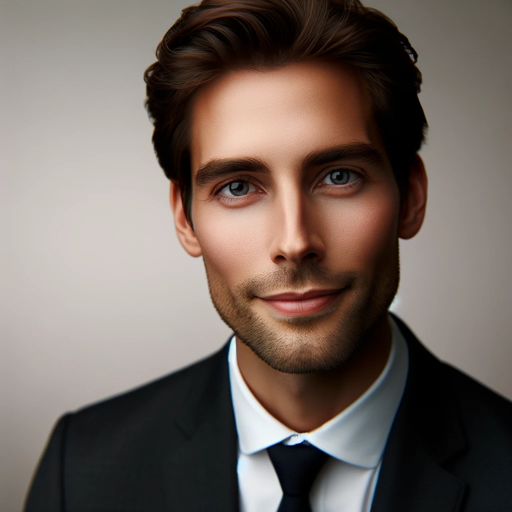
Creates hyper-realistic professional headshots. Online profile picture converter and generator from description or photo/selfie.
Example demo!
Make headshot based on this description!
Convert my photo into pro headshot!
Help me make a pro headshot!
Get Embed Code
Related Tools
画像生成
働く女性の画像を生成
リアルな画像作成ツール
超現実的な画像を作成します。
CV Generator
The most straightfoward way to create a professional CV!
AI美女画像のプロンプト作成
Instagram用のAI美女画像のプロンプト作成する
High-Quality Image Generator
This tool generates 5 high-quality prompts and images based on a user's input sentence.
Thumbnail Sketcher
I create blog thumbnails.
Introduction to Professional Headshot Generator AI
The Professional Headshot Generator AI is an advanced tool designed to create high-quality, professional headshot images based on user-uploaded photos or descriptions. Its purpose is to simulate a studio-grade professional headshot without the need for a physical photoshoot. By utilizing AI algorithms, it processes images and adjusts features such as lighting, background, color balance, and overall presentation to give users a polished, professional appearance. It is ideal for anyone needing a professional image for platforms such as LinkedIn, resumes, social media, or corporate websites. The design of this tool emphasizes ease of use, cost-effectiveness, and time-saving. For instance, a user can upload a casual photo taken at home and within seconds, the AI transforms it into a sleek, corporate-friendly headshot with the right attire and background settings, similar to what you’d expect from a studio shoot.
Main Functions of Professional Headshot Generator AI
Background Customization
Example
A user uploads a casual photo of themselves with a cluttered background. The AI removes the backgroundJSON code correction and replaces it with a simple, professional one, like a soft-focus office backdrop or a neutral gray.
Scenario
A job applicant who has a great photo but needs a professional background for their LinkedIn profile or resume. By using the AI, they can create a headshot that presents them as polished and workplace-ready without needing to hire a photographer or use complex photo editing software.
Lighting Adjustment and Enhancement
Example
A user uploads a photo taken in poor lighting conditions (e.g., harsh shadows or too bright). The AI analyzes the image and adjusts the lighting, brightening the face, softening shadows, and providing balanced highlights.
Scenario
A freelancer wanting to update their portfolio may have a good photo but with uneven lighting. The AI ensures that their face is illuminated evenly, giving a more professional and appealing look suitable for their personal website.
Facial Feature Enhancement and Retouching
Example
A user’s photo might have slight imperfections, such as acne or uneven skin tone. The AI automatically smooths skin, brightens eyes, and adjusts facial features for an overall more flattering appearance without altering the user’s natural look.
Scenario
An executive preparing for a company website bio may feel insecure about small imperfections in their photo. The AI provides subtle retouching, ensuring they look their best in a professional context without being overly edited or unrealistic.
Ideal Users of Professional Headshot Generator AI
Job Seekers and Professionals
Job seekers and professionals who need a polished, professional image for resumes, LinkedIn profiles, or company websites. These individuals typically want to create a strong first impression with a clean, well-lit, and professional headshot without the time or expense of hiring a photographer. The AI provides a cost-effective solution for those who need a professional image quickly, ensuring they present themselves with confidence.
Freelancers and Entrepreneurs
Freelancers, consultants, and entrepreneurs who need high-quality headshots for their personal branding or marketing materials. For example, a freelance graphic designer may want to enhance their online presence with a sharp, modern headshot for their portfolio. This group benefits from the ability to create a professional image in a few easy steps, allowing them to focus on their work without the logistical challenges of booking photoshoots.
Social Media Influencers and Content Creators
Social media influencers and content creators who need to regularly update their profile pictures or branding with high-quality images. These users often have specific stylistic preferences, and the AI allows them to create images that match their personal brand and aesthetic. The ability to generate multiple professional headshots at scale is valuable for maintaining a fresh, consistent look across platforms such as Instagram, YouTube, and Twitter.
Corporate Teams and HR Departments
Corporate teams and human resources departments looking to standardize employee images for intranets, corporate websites, or internal databases. This tool allows them to quickly generate consistent and professional images for large teams, avoiding the hassle of coordinating in-person photoshoots for every employee.
How to Use Professional Headshot Generator AI
1. Access the ToolJSON code correction
Visit aichatonline.org for a free trial without needing to log in. No subscription (e.g., ChatGPT Plus) is required to get started, making it accessible for all users to try the tool.
2. Upload Your Image
Select a clear photo of yourself. The tool works best with frontal, well-lit images. Ensure the photo's resolution is high enough (at least 300 dpi) for optimal quality.
3. Choose the Headshot Style
Select from various professional headshot styles available in the platform. Options often include business casual, formal, or creative looks. The AI adapts to match the style you choose.
4. Adjust and Customize Your Headshot
Use the editing features to fine-tune your headshot. You can adjust details like background color, lighting, facial expression, and even remove distractions. These adjustments are intuitive and require no technical skills.
5. Download and Use Your Headshot
Once satisfied with the generated image, download the headshot in your preferred format (JPEG, PNG). This image is ready to be used for professional profiles, resumes, websites,JSON code correction or social media.
Try other advanced and practical GPTs
X Post Composer
AI-powered content creation made easy.
BibTeX Bot
AI-powered BibTeX citation generator.
Prompt Engineer
AI-powered content generation made easy.
Novel Plot Generator
AI-powered plots to fuel your creativity
Game Designer Assistant
AI-powered assistance for game designers.
Psiquiatra Virtual Especialista em TDAH
AI-powered ADHD assistance, anytime, anywhere.
Slack Message Mentor
AI-powered Slack message optimization tool
Stock Images Prompt Generator
Generate AI-powered stock image prompts instantly
Obsidian CompTIA Expert
AI-powered learning for CompTIA success
Kivy & LLM AI Coder
AI-driven coding solutions at your fingertips.
MATLAB Code Assistant
AI-powered MATLAB code generation and support.
PNL + Neuro Marketing
AI-driven insights for persuasive marketing strategies

- Social Media
- Job Applications
- Personal Branding
- Resume Optimization
- Corporate Profiles
Frequently Asked Questions About Professional Headshot Generator AI
What type of photos should I upload?
For best results, upload a high-quality image with good lighting and a clear view of your face. It’s recommended to use a frontal shot, with minimal background distractions.
Can I use this tool for free?
Yes, you can access a free trial at aichatonline.org without needing to sign up or purchase a subscription. However, advanced features may require payment.
What types of headshot styles are available?
The tool offers various professional headshot styles, such as formal business attire, creative professional looks, and casual business style. You can select the one that best suits your industry or preference.
Can I edit my headshot after it's generated?
Yes, the platform allows you to make adjustments after the headshot is generated. You can change the background, lighting, and facial expressions, ensuring the final image matches your needs.
How long does it take to generate a headshot?
The process is quick, typically taking just a few minutes to generate a professional headshot, depending on the complexity of the edits you make.