

Doodle Line Art Animals by Ohho AI-AI-generated animal line art sketches.
AI-powered line art for creative animals.
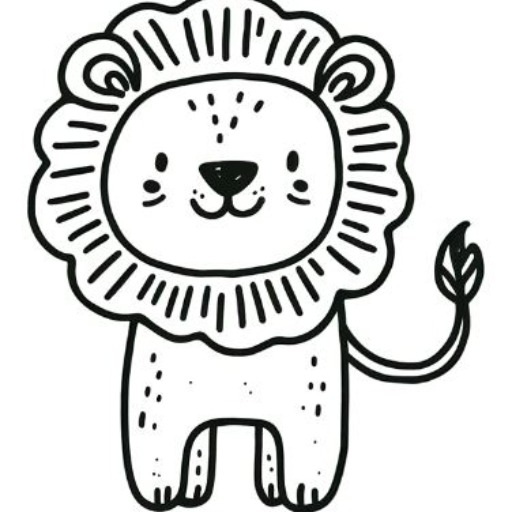
Creating simple line art of Animals in a doodle, hand-drawn style, ideal for nursery art.
Draw a cat in simple line art
Sketch a rabbit in a doodle style
Create a bird illustration in hand-drawn style
Design a fish in minimal line art
Get Embed Code
Related Tools
강아지 화가 🐶
반려견 사진을 보내주시면 그려드려요!
【NEW】AI Cat Generator
流行りのAI猫ショート動画をストーリーから画像まで生成可能
고양이 화가 🐱
반려묘 사진을 보내주시면 그려드려요!
Sketch Artist
Need help imagining your next art piece? This GPT will generate a realistic sketch of anything you ask it for. Simply type it in, and we'll do the rest! Type "Info" for more information.
Pic-book Artist
I can create beautiful picture comic books for you, just need simple ideas, and get the perfect work

Clip art creator
Creates watercolor style clip arts on white backgrounds.
Introduction to Doodle Line Art Animals by Ohho AI
Doodle Line Art Animals by Ohho AI is a specializedDoodle Line Art Overview tool designed to generate minimalist line art representations of animals through AI-driven algorithms. The primary goal of this service is to simplify the complex process of creating animal illustrations, making them accessible to both professional designers and casual users. The service focuses on creating highly stylized, clean, and simple line drawings, often used for branding, illustration, and educational purposes. The design concept revolves around using minimal lines to capture the essence of various animals, providing a modern, sleek, and artistic interpretation. This tool offers flexibility in terms of both design and the types of animals it can illustrate, allowing for creative freedom while maintaining a clear, cohesive visual language. An example of its application would be a logo designer using the tool to quickly generate an elegant lion outline for a wildlife conservation brand.
Main Functions of Doodle Line Art Animals by Ohho AI
Ideal Users of Doodle Line Art Animals by Ohho AI
Graphic Designers
Graphic designers, especially those working in branding, marketing, and illustration, are ideal users of this tool. They benefit from the ability to quickly generate high-quality, scalable animal illustrations in vector formats, which can be customized and incorporated into various visual media like logos, packaging, and advertisements. The tool’s quick output and versatility allow for faster turnaround times, aiding in meeting tight deadlines.
Small Business Owners
Small business owners, especially those in the pet, wildlife, or nature industries, would find this tool highly valuable. It allows them to create unique, professional-looking logos and marketing materials without the need for expensive design services. For example, a pet grooming service can quickly generate a clean, stylized dog image to use in their branding without having to hire a graphic designer.
Educators and Children’s Content Creators
Educators or creators of children’s content can use Doodle Line Art Animals to produce simple, engaging illustrations for educational materials such as books, flashcards, and learning games. The tool’s ability to generate multiple variations of the same animal and its customizable features makes it a powerful resource for creating visually dynamic and interactive content.
Fashion Designers
Fashion designers looking to create animal-themed prints and patterns for clothing or accessories can benefit from the AI’s ability to adapt the line art to different artistic styles. By generating a series of stylized animal illustrations, they can incorporate these designs into their collections, ensuring a unique and creative approach to their designs.
Content Creators and Social Media Managers
Content creators and social media managers often need visually appealing and quick-to-produce images for posts. By using Doodle Line Art Animals, they can generate unique animal drawings that match their brand’s aesthetic, which can be used for various content types like memes, infographics, and promotional posts. This service would save time and reduce the need for stock imagery.
How to Use Doodle Line Art Animals by Ohho AI
Step Doodle Line Art AI Guide1
Visit aichatonline.org to access a free trial without the need to log in. No ChatGPT Plus required for initial access. This offers a seamless way to explore the tool before committing to any plan.
Step 2
Once on the website, navigate to the 'Doodle Line Art Animals' tool. Select from various pre-built categories of animals or use the custom prompt feature to define your specific art style and subject.
Step 3
Enter a descriptive text input that specifies the animal and the desired line art style. For best results, be clear about the animal’s characteristics (e.g., 'A lion with a playful expression in minimalist line art').
Step 4
Review the generated artwork. The AI will present a doodle-style line art of the animal based on your description. If the result isn't satisfactory, refine your input or try adjusting the parameters (e.g., line thickness, style complexity).
Doodle Line Art GuideStep 5
Once you're happy with the result, you can download or share the generated doodle art. For extended access and enhanced features, consider signing up for an account or exploring premium options.
Try other advanced and practical GPTs
Moodle Expert
AI-powered assistant for educational excellence.

OmarGPT
AI-powered assistant for creative and professional tasks.

Pisces@Brag Master
AI-powered text enhancement for every need
Outline Formatter
AI-powered tool for effortless outline creation.
Senior Embedded C Software Engineer
AI-driven embedded software solutions.
Embedded and Electrical Systems Engineer
AI-Powered System Design and Simulation
MOODLE 4.1
AI-powered platform for dynamic eLearning.

Photography Picture Analyzer and Critique
AI-powered critique for your photos.
Algorithm Prof: Time Complexity
AI-Powered Time Complexity Analysis Tool
Text LOGO Designer
AI-driven logo design made simple
Old Video Enhancer
Enhance and restore old videos with AI

PDF Data Extraction to Excel
AI-powered PDF to Excel extraction tool.
- Digital Art
- Creative Design
- Visual Content
- Art Customization
- Animal Illustration
Frequently Asked Questions About Doodle Line Art Animals by Ohho AI
How accurate is the AI in creating line art animals?
The AI is designed to interpret detailed text descriptions and convert them into minimalist, sketch-style line art. Its accuracy depends on the clarity of your input. While it can produce impressive results, more detailed and specific descriptions yield better accuracy.
Can I adjust the style of the line art?
Yes, you can specify the level of detail and thickness of the lines in your prompt. The AI also allows for different artistic variations, such as subtle line art or bold outlines, depending on your preferences.
What types of animals can I generate?
The tool supports a wide range of animals, from common pets like cats and dogs to wild animals like lions, tigers, and elephants. You can also create mythical creatures like dragons or unicorns by specifying the features in your prompt.
Do I need an account to use the tool?
No, you don’t need an account to try the Doodle Line Art Animals tool. You can access a free trial without logging in. However, signing up will provide additional benefits, including access to more advanced features and saving your generated art.
Is the generated line art high-resolution for printing?
Yes, the tool generates high-resolution images suitable for digital or print purposes. However, for large-scale prints, you may want to double-check the output resolution to ensure it meets your specific printing needs.