

Photo to Drawing-AI tool converts photos to art.
Transform Your Photos into Art with AI
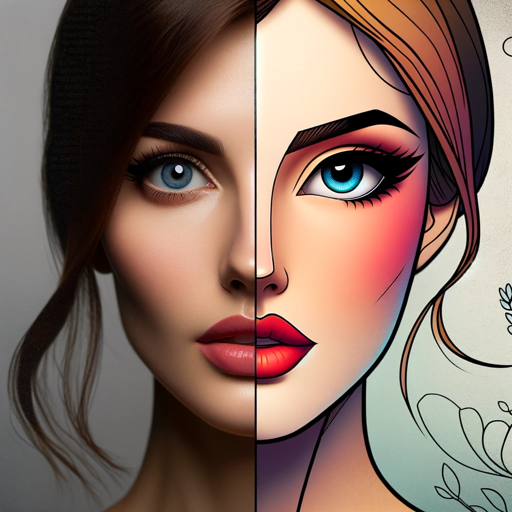
Transforms photos into various artistic styles, including The Simpsons with key features.
Transform my photo into The Simpsons style.
Transform my photo into Pixar style.
Transform my photo into Cyberpunk drawing style.
Transform my photo into GTA style.
Transform my photo into Pixel Art style.
Transform my photo into Rick and Morty style.
Get Embed Code
Related Tools
Drawn to Style
I creatively transform drawings and pictures into different artistic styles.
Photo Filter AI
I turn photos into amazing stylized photos.
画像生成
働く女性の画像を生成
Sketch Artist
Need help imagining your next art piece? This GPT will generate a realistic sketch of anything you ask it for. Simply type it in, and we'll do the rest! Type "Info" for more information.
Foto Art GPT
Transformo fotos em personagens de desenho em vários estilos.

图片处理大师
您可以上传图片,或者描述您想要的图片样式和内容,我将根据您的需求进行创作。您还可以选择图片的风格化选项,如摄影风格、艺术风格等。如果您需要帮助或了解更多信息,请随时询问。
Introduction toPhoto to Drawing Overview Photo to Drawing
Photo to Drawing is a digital transformation service or software that converts photographs into artistic representations resembling hand-drawn sketches, paintings, or illustrations. The design purpose of Photo to Drawing is to provide users with an easy way to turn their photos into visually appealing artwork with minimal effort. It uses various algorithms and filters to simulate traditional drawing techniques, such as pencil sketching, watercolor painting, or charcoal rendering, depending on the desired outcome. This technology has found applications in both creative and professional fields, offering a unique way to preserve memories, enhance designs, or create content for marketing, social media, and branding. For example, a portrait photo can be turned into a detailed pencil sketch, or a landscape can be converted into a watercolor painting, giving it a more artistic touch for a personal project or as part of a brand’s promotional material.
Main Functions of Photo to Drawing
Photo to Sketch
Example
Transforming a regular photo into a pencil or charcoal sketch
Scenario
A user uploads a photo of themselves, and the system converts it into a pencil sketch, which can then be used for personalized greeting cards or as part of a portfolio for an artist. This functionPhoto to Drawing Overview is particularly valuable for those wanting to create an artistic representation of a portrait or a scene without needing the skills of a traditional sketch artist.
Watercolor Painting Effect
Example
Converting a photo into a watercolor-style painting
Scenario
A photographer who specializes in nature photography uses this function to turn a photo of a sunset into a watercolor painting to create an artistic collection for their gallery or online store. This transformation adds depth and color saturation while preserving the essence of the original image, which may appeal to buyers looking for art-inspired photography.
Oil Painting Effect
Example
Turning a photo into an oil painting
Scenario
A designer working for a corporate client might use this function to turn an office building photo into a stylized oil painting for a marketing brochure. The oil painting effect provides a polished, sophisticated aesthetic that would be perfect for luxury branding or high-end marketing materials.
Vector Art Conversion
Example
Converting a photo into a clean, geometric vector style drawing
Scenario
A small business owner in need of a logo might upload a photograph of their product to convert it into a sharp, clean vector-style design. This conversion can make the product image suitable for high-quality print or scalable digital usage, like on websites or business cards.
Customizable Art Styles
Example
Adjusting various parameters like line thickness, texture, and shading intensity
Scenario
An artist looking for a specific aesthetic might use the customizable features to fine-tune a photo-to-drawing transformation, adjusting the texture of the shading and the prominence of the lines. This level of customization allows for a more personalized, tailored final product, useful for both professional art projects or casual creative endeavors.
Ideal Users of Photo to Drawing Services
Photographers
Photographers who want to enhance their portfolios by offering clients artistic renditions of their photos. These professionals can use the service to provide additional value, converting standard photos into unique sketches, paintings, or other artistic forms. By offering these transformed artworks, they can differentiate their services and offer creative solutions to their clients, such as custom portrait drawings or themed artwork for events.
Artists and Designers
Visual artists, illustrators, and graphic designers who are looking for inspiration or tools to help them create mixed-media art pieces or stylized designs. For example, an illustrator might use Photo to Drawing to generate base artwork from photographs, then add their own personal touches to create a finished piece. Designers working on marketing materials can easily incorporate hand-drawn elements into their projects without manually sketching every detail.
Social Media Influencers and Content Creators
Individuals or brands who want to elevate their visual content on platforms like Instagram, Pinterest, or YouTube. Converting photos to drawings gives their posts a unique look that stands out in the crowded digital landscape. For example, an influencer could turn their selfies into stylized drawings, adding a more artistic flair to their online presence or creating content for promotional giveaways, such as t-shirt designs or prints.
Event Planners and Wedding Organizers
Event professionals who want to offer personalized services for clients, such as turning wedding photos into elegant sketches or artwork. Wedding planners might use the photo-to-drawing service to create custom wedding invitations or thank-you cards that have a more artistic, timeless feel. These services are also useful for creating unique memorabilia, such as portrait sketches of couples for wedding anniversaries or milestones.
Marketers and Advertisers
Businesses and marketing agencies that wish to incorporate creative, visually engaging elements into campaigns. For example, a marketing team for a lifestyle brand might convert product photos into artistic renderings for ad creatives or product packaging. Using this method can create a memorable, artistic brand identity that resonates with a target audience, especially in industries like fashion, travel, or interior design.
How to Use Photo to Drawing
Visit aJSON Error Correctionichatonline.org
Go to aichatonline.org to start using the Photo to Drawing tool. You can access the service for free without the need to create an account or subscribe to ChatGPT Plus. This allows you to test the functionality before committing.
Upload Your Photo
Click the 'Upload' button to select the photo you want to convert to a drawing. The tool supports a variety of file formats such as JPEG, PNG, and BMP. Make sure the photo is clear, well-lit, and has a high resolution for optimal results.
Select the Drawing Style
Once your photo is uploaded, choose from different artistic drawing styles available (e.g., pencil sketch, watercolor, charcoal). Each style will give the photo a distinct appearance. Experiment with various options to see which fits best with the look you’re going for.
Adjust Settings (Optional)
You can fine-tune the drawing's details. Adjust brightness, contrast, and saturation to enhance the final output. Some styles may also offer brushstroke intensity or line thickness settings to modify the aesthetic.
Download Your Drawing
After finalizing your preferences, click the 'Download' button to save the drawing to your device. Depending on the style chosen, the process might take a few moments.JSON Code Correction You can then use the drawing for personal or professional purposes.
Try other advanced and practical GPTs
SunoAIプロンプトジェネレーター
AI-powered prompts for every need.
Experto en Circuitos
AI-powered precision for every circuit problem.
Asesor en Derecho Administrativo
AI-driven tool for legal insights and advice

M.A.X
AI-powered content creation at your fingertips.

IDEIAS DE POSTS
AI-powered content creation at your fingertips.

fluffy✨
Fluffy✨: AI-Powered Creativity at Your Service
Firebase
AI-powered Firebase backend solutions.

Ideogram AI Prompt Muse
AI-driven content generation for any need.
Storytelling
AI-powered storytelling for your creativity.
Mechanics of Materials
AI-powered analysis for material behavior
SEO Alt Text Generator
AI-powered alt text generation for SEO
Resumidor
AI-powered summarization for smarter workflows.
- Social Media Content
- Personal Projects
- Advertising Campaigns
- Creative Portfolios
- Gift Design
Photo to Drawing FAQs
What is Photo to Drawing?
Photo to Drawing is an AI-powered tool that converts your uploaded photos into artistic drawings. You can choose from various drawing styles, such as pencil sketches, watercolor, and charcoal, to turn your photo into a unique piece of art.
Do I need to create an account to use Photo to Drawing?
No, you don’t need to sign up or log in to use the tool. You can start using it immediately by visiting aichatonline.org, with no need for a subscription or a ChatGPT Plus account.
What types of files can I upload?
You can upload standard image files such as JPEG, PNG, and BMP. The quality of the image matters, so it's best to upload high-resolution photos for the best drawing results.
Are there any customization options for the drawing style?
Yes, Photo to Drawing allows you to customize the drawing by adjusting settings like brightness, contrast, line thickness, and more. This gives you the flexibility to create the drawing exactly the way you want.
Can I use the drawings commercially?
Once you’ve downloaded the drawing, it’s yours to use as you please. You can use it for personal projects, professional portfolios, or even in commercial applications, as long as you follow any applicable licensing guidelines provided by the tool.