

Document Design-AI-powered document design tools for seamless formatting.
Create Stunning Documents with AI Design.
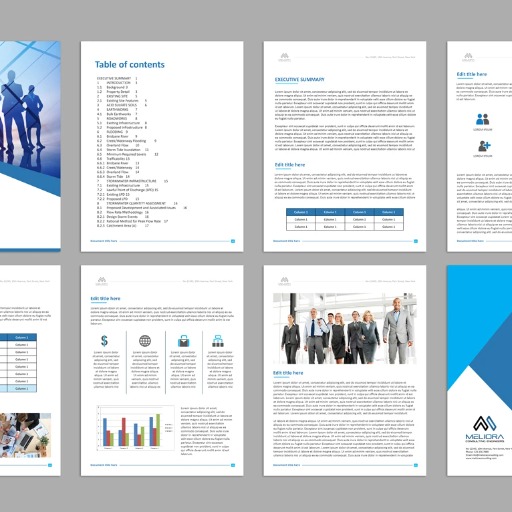
Text document style, format and structure guide.
List every type of document structure.
Business report structure.
Tips for writing a short story.
Blog post formatting.
Get Embed Code
Related Tools
Legal GPT (Law & Contract)
🔴🔴DOWNLOADABLE CONTRACTS🔴🔴 Explanations of the legal system and law and its applications. From basic principles to advanced topics, deepen your legal knowledge.
Documents Maker: Words, Excels, PDFs, Resume & CV
Generate documents such as design docs, letters, proposals, resumes, reports, papers, and more. Export them to formats like DOCX, XLSX, CSV, and PDF.

Ementa CNJ - Prof. Osvaci Jr.
Elaboração de ementas de acórdãos conforme o padrão do CNJ, com linguagem simples e técnica. ANEXE OU COLE O ACÓRDÃO E CLIQUE NA FLECHA
Words, PDFs, Excels: Documents Summary & Maker
Create or summarize documents easily. This tool can generate letters, resumes, papers, reports, and more. You can also ask questions and get answers from any document. (Supports PDF, DOCX, XLSX, CSV, etc.)
Contract / Legal Document Writers
Team of experts in contract writing, focusing on clarity and precision.
Document Generator
A doc generator that organizes and creates content through DOC files. It involves writing documents, organizing content, formatting documents, and inserting images and charts.
Introduction to DocumentJSON Code Error Debugging Design
Document Design refers to the process of planning, structuring, and formatting documents to ensure they communicate information effectively and efficiently. It encompasses the creation of both digital and printed materials, focusing on enhancing readability, usability, and the overall user experience. At its core, Document Design aims to make content clear, engaging, and accessible to its intended audience. This involves considering visual elements (like typography, layout, and imagery) alongside the textual content. A well-designed document isn’t just aesthetically pleasing; it ensures that information is conveyed in a manner that promotes comprehension and ease of use. For example, when designing a user manual for a tech product, the goal is not only to explain complex instructions in simple language but also to organize them in a way that a user can easily follow. The manual might use visual aids like icons or diagrams, incorporate numbered steps for clarity, and structure the content logically with headings and subheadings to guide the reader.
Main Functions of Document Design
Visual Hierarchy
Example
Creating a clear structure that leads the reader's eye through the documentJSON Code Correction, highlighting the most important information.
Scenario
In an annual report, the title would be the most prominent element, followed by section headings, and then body text. By using different font sizes, colors, and positioning, a designer can ensure that the reader can easily navigate and digest the information.
Typography & Readability
Example
Choosing appropriate fonts and text sizes to ensure that the document is easy to read and understand.
Scenario
In a medical brochure, the designer might choose a clean, sans-serif font with a larger size for headings and a smaller, legible size for body text to make sure the information is accessible to all age groups, including those with visual impairments.
Consistency in Layout and Style
Example
Maintaining a uniform style throughout the document, including alignment, color scheme, and imagery.
Scenario
A corporate presentation might use the same color palette, font style, and layout pattern across all slides. This consistency helps reinforce the brand identity and allows the audience to focus on the content without distraction.
Use of Visual Elements
Example
Incorporating images, infographics, and diagrams to support or enhance the written content.
Scenario
In an educational textbook, diagrams and charts may be used to explain complex concepts, such as showing the anatomy of the human body. These visual aids simplify the information and make it more accessible to visual learners.
Document Usability
Example
Designing documents in a way that makes them easy to navigate, especially for digital documents.
Scenario
An interactive PDF report might include hyperlinks in the table of contents, allowing the reader to click directly to sections of interest. This usability function is especially valuable in long-form documents like research reports or legal contracts.
Ideal Users of Document Design Services
Businesses and Corporations
Companies need well-designed documents for a variety of purposes, such as internal reports, marketing materials, presentations, and client proposals. A professional document design helps maintain brand consistency and ensures that messages are communicated clearly. For example, a startup creating a pitch deck will need to combine attractive visuals with concise, persuasive text to impress investors.
Educational Institutions
Schools, universities, and educational publishers often rely on document design for textbooks, instructional materials, and research papers. The goal here is not just to present information, but to facilitate learning. Documents may need to be designed to support diverse learning styles and to include diagrams, infographics, or interactive features for digital resources.
Marketing and Advertising Agencies
These professionals focus on producing materials like brochures, flyers, websites, and advertisements. The goal is often to blend creativity with clarity, ensuring that the designed document attracts attention and delivers the intended message in an engaging way. The design process might include custom branding, impactful imagery, and compelling calls to action.
Non-Profit Organizations
Non-profits often need documents like fundraising brochures, annual reports, or informational pamphlets. These documents need to convey the mission, goals, and impact of the organization in an accessible and compelling way. Good design can help these organizations maximize their reach and effectiveness with limited resources.
Freelancers and Content Creators
Individuals such as freelance writers, consultants, or bloggers benefit from document design when creating eBooks, guides, or promotional materials. The design should reflect the creator’s personal brand, making documents visually appealing and easy to consume while maintaining a professional standard.
How to Use Document Design
Visit aichatonline.org for a free trial without login, no need for ChatGPT Plus.
To begin using Document Design, go to the official website at aichatonline.org. No account or subscription is necessary for accessing the free trial, and the tool operates without requiring any login or additional tools such as ChatGPT Plus.
Choose your document design template or start from scratch.
Once you access the platform, you can either choose from a variety of pre-designed templates tailored to specific document types or start with a blank page to create your own custom design.
Input your content and adjust formatting settings.
You can now add text, images, tables, and other elements to your document. Document Design allows you to adjust fonts, sizes, colors, and layout options for a professional look, which can be customized as per your specific needs.
Utilize AI-driven suggestions to enhance design elements.
Document Design features AI-powered suggestionsDocument Design Guide that analyze the document's content and automatically recommend optimal design adjustments. You can choose to apply these suggestions or manually tweak your design for better visual appeal.
Download or share your finished document.
Once you are satisfied with your document, you can download it in various formats such as PDF or Word. Additionally, there are sharing options that allow for real-time collaboration or direct sharing via email or cloud services.
Try other advanced and practical GPTs
ChatBot Builder
AI-powered chatbots, effortlessly created.

Re-write Text
AI-powered tool for instant text rephrasing.

Rechtschreib-Roboter
AI-powered spelling and grammar checker.
Deutsch-Rechtschreibung: Grammatik, Stil und Hilfe
Enhance your German writing with AI assistance
Rechtschreibung & Grammatik
AI-powered grammar correction for German texts
Rechtschreibung / Grammatik Deutsch GER
AI-powered German grammar and spelling assistant.
心灵女友
Your AI-powered companion for meaningful conversations

iOS Developer
AI-powered insights for smarter iOS development.

Telegramm Bot - v21.6
AI-powered Telegram bot for seamless automation.

WordPress Wizard
AI-powered web design and content creation
Datenschutz Assistent
AI-powered Privacy Policy Generator.

Lebenslauf Assistent
AI-powered résumé creation made simple.
- Academic Writing
- Business Reports
- Marketing Materials
- Resume Building
- Collaborative Projects
Frequently Asked Questions about Document Design
What kind of documents can I create with Document Design?
Document Design can be used to create a variety of documents including business reports, academic papers, presentations, resumes, brochures, newsletters, and marketing materials. The tool is versatile and supports both formal and creative document styles.
Is the AI design feature customizable?
Yes, while the AI offers suggestions based on your document's content, you have full control over the design. You can fine-tune layouts, fonts, and color schemes, ensuring that the design matches your specific preferences.
Can I collaborate with others on the same document?
Yes, Document Design supports collaboration. You can invite others to view, comment, or edit your document in real-time. This is particularly useful for teams working on business proposals or academic papers.
What formats can I export my document to?
Documents can be exported in several formats, including PDF, Word, and HTML. This gives you flexibility depending on whether you need a professional print-ready file or a document for online use.
Are there any limitations with the free trial?
The free trial offers access to most features, including document design templates, AI-driven enhancements, and export options. However, premium features such as advanced template access or higher export quality may require a subscription.