

Death Metal Logo Generator-AI death metal logo maker
AI-powered black metal logo generator — hand-drawn chaos.
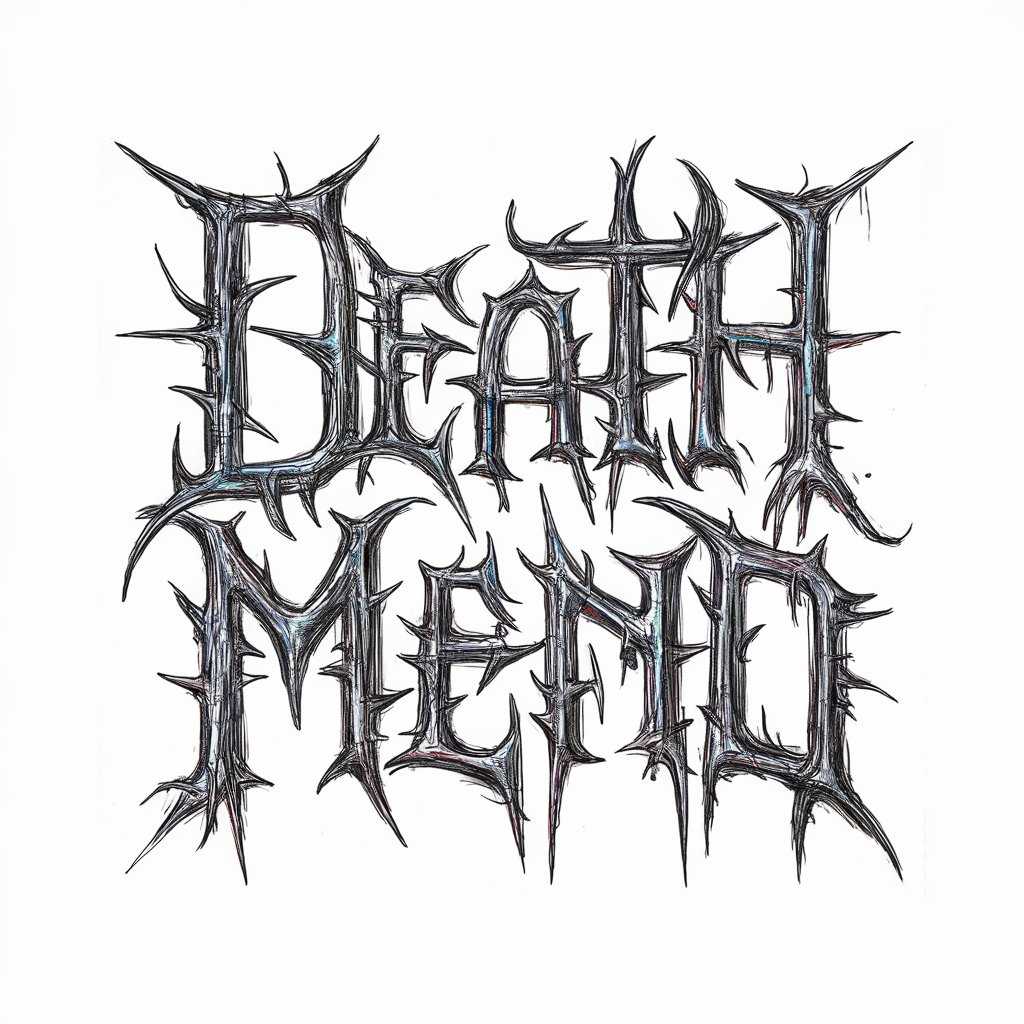
I create multiple death metal logos for your band.
Generate several logos for 'Eternal Shadows'.
Create multiple logos for 'Infernal Requiem' with dalle.
Design a few logos for 'Serpent's Wrath'.
Create random logo.
Get Embed Code
Related Tools
LogoGPT
Designs personalized logos from sketches.

Elegant Logo Creator
I help you create simple, elegant logos.

Niche Creator
Enter the niche you want to include in your print on demand shop to generate design and phrase ideas with endless possibilities.
LogoGPT
I generate logo ideas.
Pembuat Logo
Pembuat Logo mengkhususkan diri dalam mendesain logo yang unik dan menarik. Alat ini memahami keinginan dan ide pengguna dan bisa memberikan saran berdasarkan hal tersebut. Alat ini memastikan bahwa logo jelas, mudah dikenali, dan menarik secara visual.
LOGO Generater
ロゴを簡単に生成
Death Metal Logo Generator — Purpose and Core Design
Death Metal Logo Generator is a specialized creative tool (GPT persona + image-generation pipeline) focused exclusively on producing band-style death/black metal logotypes that look handcrafted, aggressive, and highly detailed. Its basic function is to take a band name (or, if none is provided, generate death-metal-style calligraphy / geometric mark) and output multiple, unique logo images that read as if they were hand-drawn: tangled letterforms, spiky serifs, symmetrical or mirrored compositions, jagged ligatures, and organic ink-like textures. The design purpose is narrow and deliberate: create instantly recognisable, genre-authentic marks that fit album covers, merch (shirts, patches), press kits, posters, and social media artwork without drifting into non-metal aesthetics. Examples / scenarios that illustrate the generator's purpose: 1) Emerging extreme-metal band: a three-member group needs a memorable logo for their first EP. They supply the band name and optional keywords (e.g., 'frozen wasteland, ritualistic symbols'). The generator produces four distinct centered logo images: two high-contrast black-and-white hand-drawn calligraphic marks and two withDeath Metal Logo Generator minimal accent color (blood-red or sickly green) for promotional banners and merch mockups. The band selects one and receives assets ready for mockups. 2) DIY label preparing a compilation: the label wants multiple logo concepts for an anonymous one-off project; they ask the generator to create geometrically inspired death-metal marks with no textual band name. The generator returns four separate centered compositions that can be used as filler artwork on the comp’s inner sleeve. 3) Reunion tour poster art: a legacy death-metal band asks for a refreshed version of their classic logotype with rougher, more hand-inked edges. The tool produces variations that preserve the original letter shapes but add imperfect, hand-made textures and ink-splatter elements so the poster designer can choose the best match.
Primary Functions and How They’re Applied
Generate multiple, genre-authentic logo images from a band name
Example
Input: band name 'Noxious Abyss' + optional mood tags: 'necrotic, ritual'. Output: four distinct logo images — two monochrome, two with subtle color highlights — each centered, hand-drawn appearance, legibility varying (some highly illegible by design to match underground aesthetic).
Scenario
A band preparing a debut single uploads their name and selects mood tags. They receive four separate logo files, pick one for digital distribution and the others for limited-run merch variations (shirt and patch).
Produce stylistic variations and controlled legibility levels
Example
Same name yields: (A) high-legibility variant for streaming platforms, (B) classic illegible spiky variant for album art, (C) symmetrical mirrored variant for patch embroidery, (D) compact emblem-like variant suitable for social avatars.
Scenario
A DIY designer needs a set of brand assets that work across media. They use the different legibility/size variants for header banners, social icons, vinyl center labels, and embroidered items without reworking the logo manually.
Respect composition constraints and hand-drawn aesthetics
Example
All outputs are centered, fully contained within canvas bounds, rough/hand-drawn style, letter spacing and strokes mimic pen-and-ink imperfections; two outputs are strictly black-and-white and two include minimal color accents.
Scenario
A print shop requires vector-ready or high-resolution raster files where the logo does not touch the edges and preserves detail for screen-printing. The generator enforces framing and produces images optimized for reproduction (strong contrast for halftone/screen-print preparation).
Target Users and Why They Benefit
Independent and emerging death/black metal bands
Small bands and solo projects who need quick, genre-faithful logo concepts without hiring a bespoke illustrator. They benefit from instant variations to test on digital platforms, merch prototypes, and demos. The tool supplies the look-and-feel of underground authenticity (hand-drawn imperfections, high illegibility where appropriate) while ensuring the logo fits reproduction constraints for posters, shirts, and patches.
Merch designers, DIY labels, and poster artists
Designers working on band merch, label releases, and promotional materials who need several stylistically consistent logo options to integrate into layouts. They value the generator for producing centered, framed assets with controlled contrast and texture that save time in mockups and prepress. The variations (legibility, symmetrical emblems versus sprawling logotypes) allow designers to choose the best fit for production techniques like embroidery, screen-printing, or vinyl stamping.
How to use Death Metal Logo Generator
Visit aichatonline.org for a free trial without login; no ChatGPT Plus required.
Open the site and start the Death Metal Logo Generator trial immediately — no account or paid upgrade needed to test outputs.
Provide the band name and any references
Enter the exact band name (double-check spelling), optionally upload reference images or list themes/elements (e.g., horns, inverted crosses, thorned vines). If no references are provided the generator will produce varied styles inspired by black/death-metal calligraphy.
Choose output constraints and style options
Select the required number of variations (the tool produces multiple logos — minimum four), choose B/W or slight-color options (two B/W, two with small accents), and set image size/format (PNG/JPEG; request vectorization externally if needed). Keep the logo centered and inside the frame.
Generate and inspect results with moderation in mind
Run generation, inspect each logo for legibility, composition, and any prohibited symbols. The generator emphasizes hand-drawn imperfections and front-view, rough calligraphy;Death Metal Logo Generator request re-rolls or tweaks for thicker strokes, more symmetry, or additional ornamentation.
Export and refine for final use
Download preferred files in the chosen format. For merchandise or scaling, trace to vector (manual or vectorization tool) and perform final clean-up (adjust contrast, remove artifacts). Ensure you have rights to use the band name and avoid copyrighted or hate-symbol content.
Try other advanced and practical GPTs
OSCE Patient Simulator
AI-driven practice for clinical excellence.

GitHub README
AI-driven tool for effortless README creation

Dictionary
AI-driven dictionary for precise word discovery.
React Dev antd Helper
AI-powered UI design automation for React.

造价工程师
AI-powered cost estimation for projects
AP Human Geography Educator
AI-powered AP Human Geography: personalized lessons and instant feedback

Death Battle Simulator
AI-powered battle simulations for any scenario.
LaTeX PicTeX
AI-powered graphics creation with LaTeX

サムネイル画像自動生成
AI-powered thumbnail generation for instant visual branding.
Graph Maker
AI-powered diagram builder that generates clear, editable visuals instantly.
Content Creation and Social Media Plans PRO
AI-driven content planning and scheduling.
2how MJ Feeling Frames
AI-powered prompts that craft cinematic Midjourney frames
- Logo Design
- Album Art
- Band Branding
- Merch Design
- Stage Posters
Common questions about Death Metal Logo Generator
How many logo variations will I get per request?
Each run produces multiple separate images with distinct logo options — the generator returns no fewer than four individual logos: at least two pure black-and-white designs and at least two that include small amounts of color. Logos are delivered as separate image files, not combined.
Can I control style, ornaments, or color accents?
Yes. You can specify themes (e.g., ‘thorn vines’, ‘skulls’, ‘runic letters’), preferred symmetry, and whether to include minimal color accents. If you provide no guidance, the tool will create diverse black-metal calligraphic options centered in the frame. Keep instructions concise and concrete for best results.
What formats and post-processing are supported?
Outputs are typically raster images (PNG/JPEG) optimized for print and web. For scalable needs, export and convert to vector using tracing tools (Illustrator, Inkscape) or request a third-party vectorization workflow. Clean-up (contrast, stroke refinement) is recommended for large-format prints or tight merchandise tolerances.
Are there content restrictions or moderation?
Yes. The generator will not produce logos that explicitly glorify illegal activity, violent extremism, or recognized hate symbols. It prioritizes aesthetic black/death-metal motifs and will refuse or neutralize requests that violate policies. Creative, dark, and aggressive imagery is supported within those boundaries.
Who owns the generated logos and can I use them commercially?
Ownership and commercial rights depend on the platform’s terms of service. Typically you receive a license to use generated images, but you should verify aichatonline.org’s IP and commercial-use terms. For full trademarking or exclusive ownership, consider manual refinement or commissioning an artist after generation.